

Manage the Unified Namespace
The Namespace → Manage page is the visual editor for your Unified Namespace. It is a three-pane workspace: namespaces on the left, the folder/tag tree in the middle, and tag details on the right.
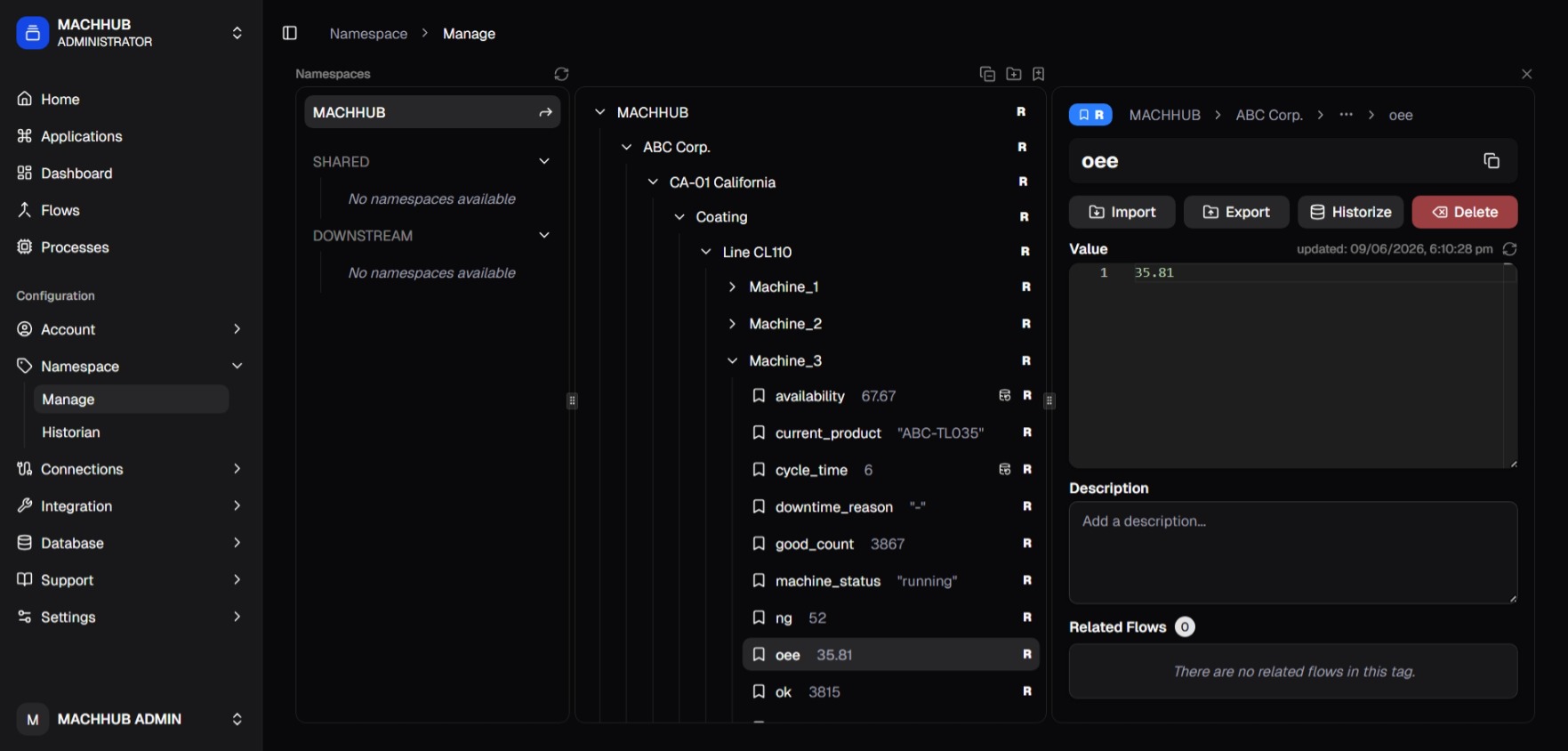
/namespace/manage) — namespaces, the tree, and tag details.Pane 1 — Namespaces
Section titled “Pane 1 — Namespaces”Each domain owns exactly one namespace. The left pane lists the namespaces you can work with:
- your domain’s own namespace (selected at the top);
- Shared — namespaces another domain has shared with you (see namespace sharing);
- Downstream — namespaces coming from downstream MACHHUB instances (also called upstream clients) connected via Upstreams.
Pane 2 — The tree
Section titled “Pane 2 — The tree”The middle pane is the recursive folder / tag tree:
- Folders organize the tree and can be expanded/collapsed.
- Tags are leaves (shown with a bookmark icon) — each maps to an MQTT topic.
- An icon marks tags that are historized.
Use Add Folder and Add Tag to grow the tree (names again cannot contain
#/+).
Folder actions (right-click)
Section titled “Folder actions (right-click)”Right-click a folder to open its context menu, with two actions:
Auto Discovery
Section titled “Auto Discovery”Auto Discovery automatically discovers and creates tags under the folder based on the data received on it — so you don’t have to define every tag by hand.
- Right-click the folder → Auto Discovery. A settings dialog opens.
- Toggle Auto Discovery on.
- Optionally set a Timer — how long Auto Discovery stays active (
None,1 minute,5 minutes,10 minutes,30 minutes,45 minutes, or1 hour). With a timer, Auto Discovery turns off automatically when the timer elapses;Noneleaves it on until you turn it off. - Save.
Once enabled, a pulsing icon appears next to the folder to show Auto Discovery is active.
Bind to Namespace
Section titled “Bind to Namespace”Bind to Namespace binds this folder to a target namespace on a connected Upstream, so the folder’s tags mirror to the upstream MACHHUB. See Upstreams → namespace bindings.
Pane 3 — Details
Section titled “Pane 3 — Details”Selecting a folder or tag opens its detail panel:
- Topic breadcrumb — the full path, collapsing to a dropdown when deep.
- Live value (tags) — the console subscribes to the tag over MQTT and shows its current value. You can edit the value and Send (publish) it.
- Import / Export — export the folder/tag tree structure (the shape, without tag data) so it can be imported under another namespace or folder.
- Historize — toggle history recording for the tag.
- Description — free-text notes (Markdown).
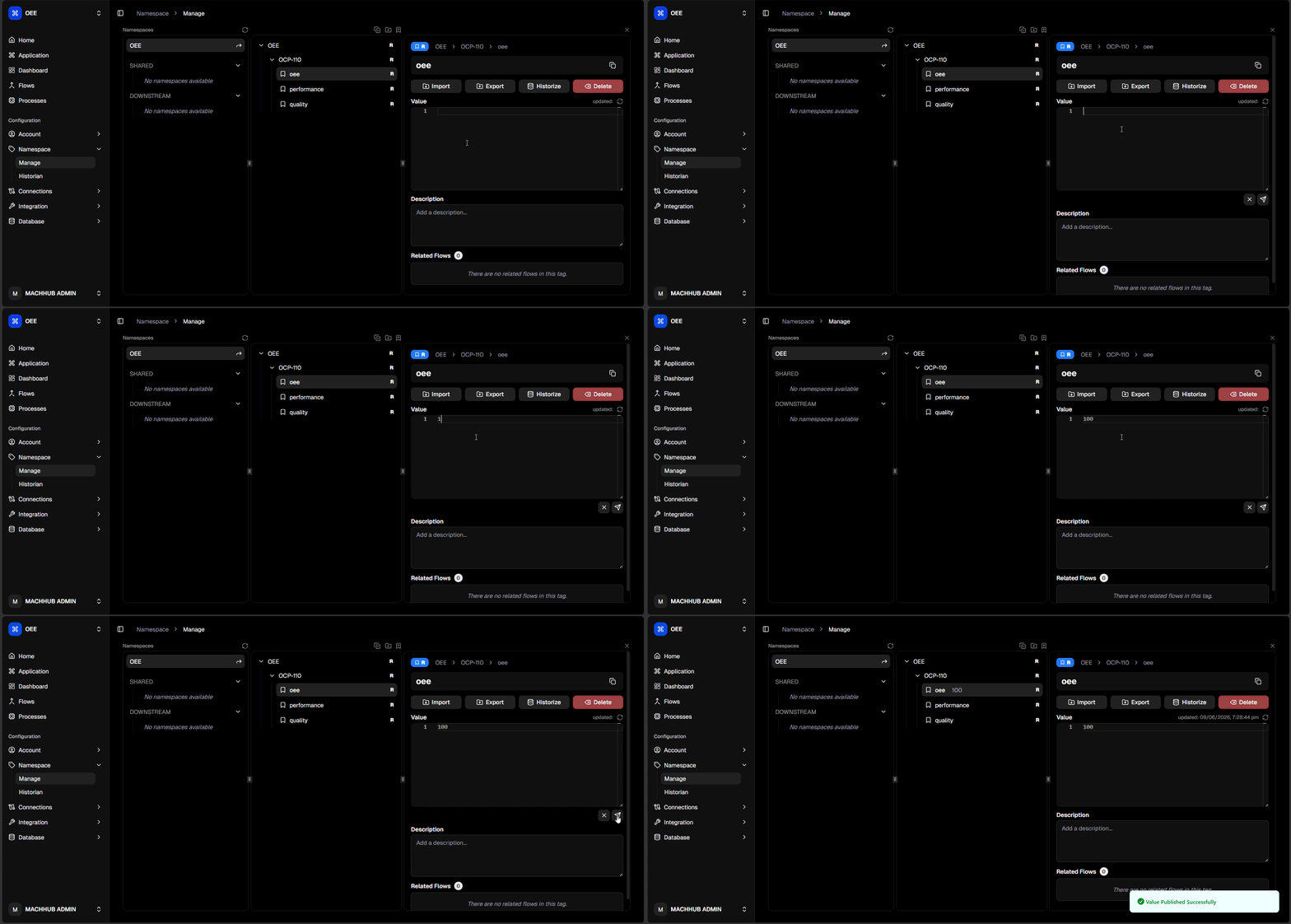
Common tasks
Section titled “Common tasks”- Enable history on a tag → Historize a tag.
- Mirror tags to another MACHHUB instance → bind the namespace in Upstreams.
- View history → Historian.
Related
Section titled “Related”- Concept: Unified Namespace and Realtime
- Code: SDK → Realtime